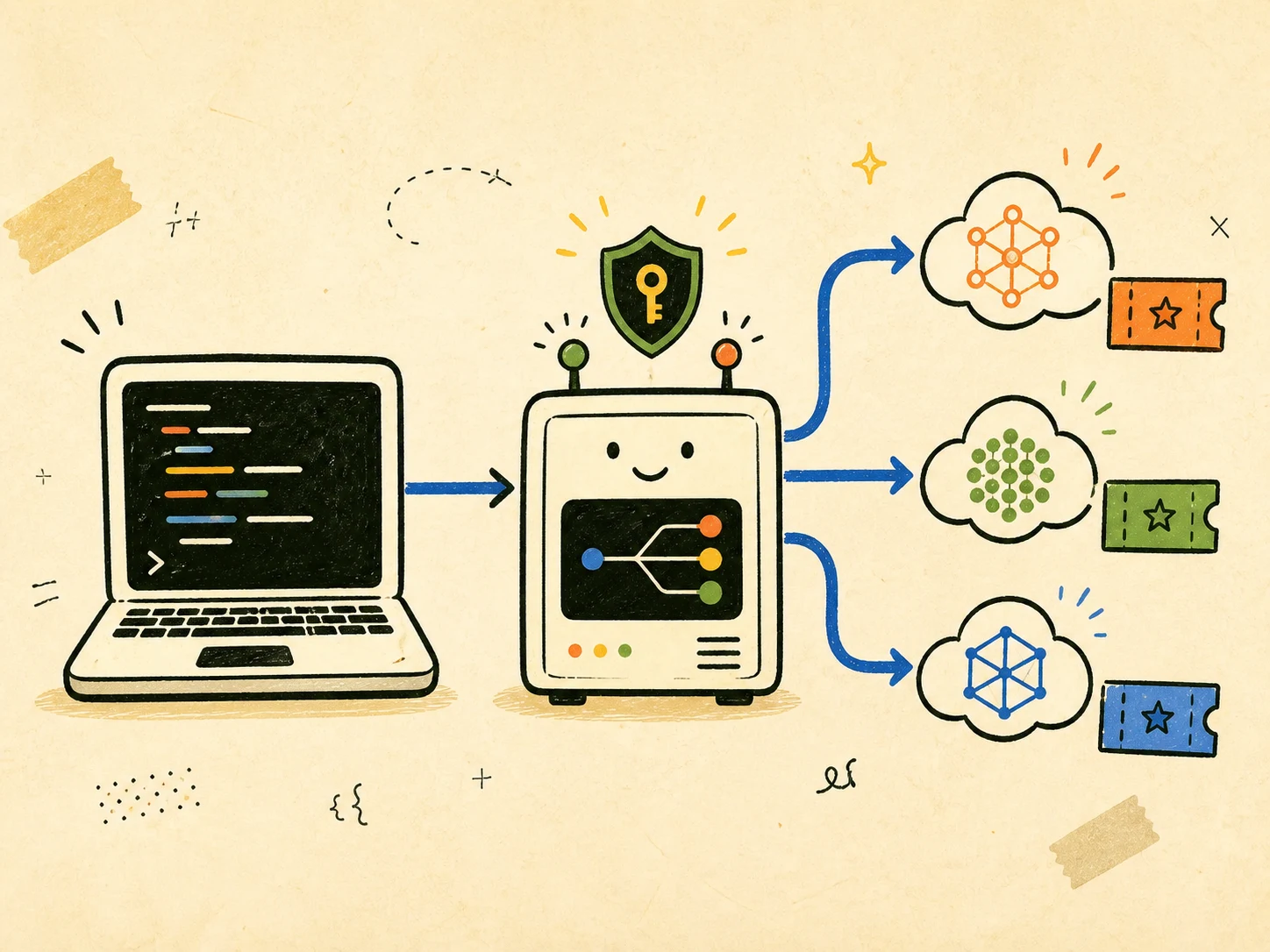
CLIProxyAPI places 1 local, compatible endpoint between my tools and the model access included with supported accounts.
Imagine that I am already paying for Claude Pro, Claude Max, or ChatGPT Plus. I am building an agent and want to test it with 1 of the frontier models included in that subscription. The moment I connect the agent through an API, however, I am normally asked to create a separate developer account, enable pay-per-token billing, or deposit more money with an aggregator such as OpenRouter.
That feels like paying twice for the same development experiment. If I already pay for access to a model and still have allowance available, why should testing my agent require another bill before I even know whether the idea works?
This is where CLIProxyAPI comes in. It lets me authenticate supported paid accounts through OAuth and place their eligible CLI-model access behind 1 local, compatible API. Instead of adding a metered provider key to an unfinished project, I can point the agent at localhost, test it with models already included in my plan, and move to a production API only when the experiment earns that cost.
Under the hood, CLIProxyAPI stores the OAuth credentials locally and exposes OpenAI-, Anthropic-, Gemini-, and Codex-compatible endpoints. The proxy translates each request and routes it to the selected provider. This makes it especially useful for evaluation: I can call the models currently available to my accounts and compare their behaviour on the same task without creating a separate pay-per-token API bill for those tests.
There is an important limit: a subscription is not API credit, and CLIProxyAPI does not make it unlimited. Requests use the provider’s supported CLI/OAuth route and consume the allowance attached to that account. Rate limits, rolling usage windows, model availability, regional restrictions, and provider terms still apply. I use this for my own development and testing, not to resell access, share an account, bypass a quota, or publish an unauthenticated proxy.
Which paid accounts can I use?
The project changes quickly, so I treat its current provider documentation as the source of truth. The most relevant subscription-backed flows are:
| Account | CLIProxyAPI login | What it uses |
|---|---|---|
| ChatGPT account with Codex access | --codex-login |
The Codex models and quota currently eligible for that ChatGPT plan |
| Claude Pro or Max account with Claude Code access | --claude-login |
The Claude Code models and usage limits included with that plan |
| Google Antigravity account | --antigravity-login |
The models and allowance currently available to that account |
Do not assume that buying a consumer chat plan automatically unlocks every model or the provider’s normal developer API. CLIProxyAPI can only expose what the authenticated CLI channel makes available. The reliable way to discover that set is to log in and request /v1/models.
This also explains the main economic difference. With a normal API key, input, output, cache, and tool usage can generate a metered invoice. With a supported OAuth account, these proxy requests draw from the subscription’s eligible allowance instead. That can make short-lived tests predictable in cost, but it can also use quota that I need later in the provider’s official coding client.
The request path
The proxy does not run a model on my computer. The complete path is:
My client
  -> http://127.0.0.1:8317
  -> CLIProxyAPI selects the matching OAuth account
  -> provider CLI endpoint
  -> model response translated for my client
Because CLIProxyAPI supports several protocol shapes, an OpenAI-compatible experiment can call /v1/chat/completions or /v1/responses, while Claude-compatible clients can use the Anthropic message interface. The official overview also documents streaming, tool calls, images, and multi-account routing where the upstream supports them.
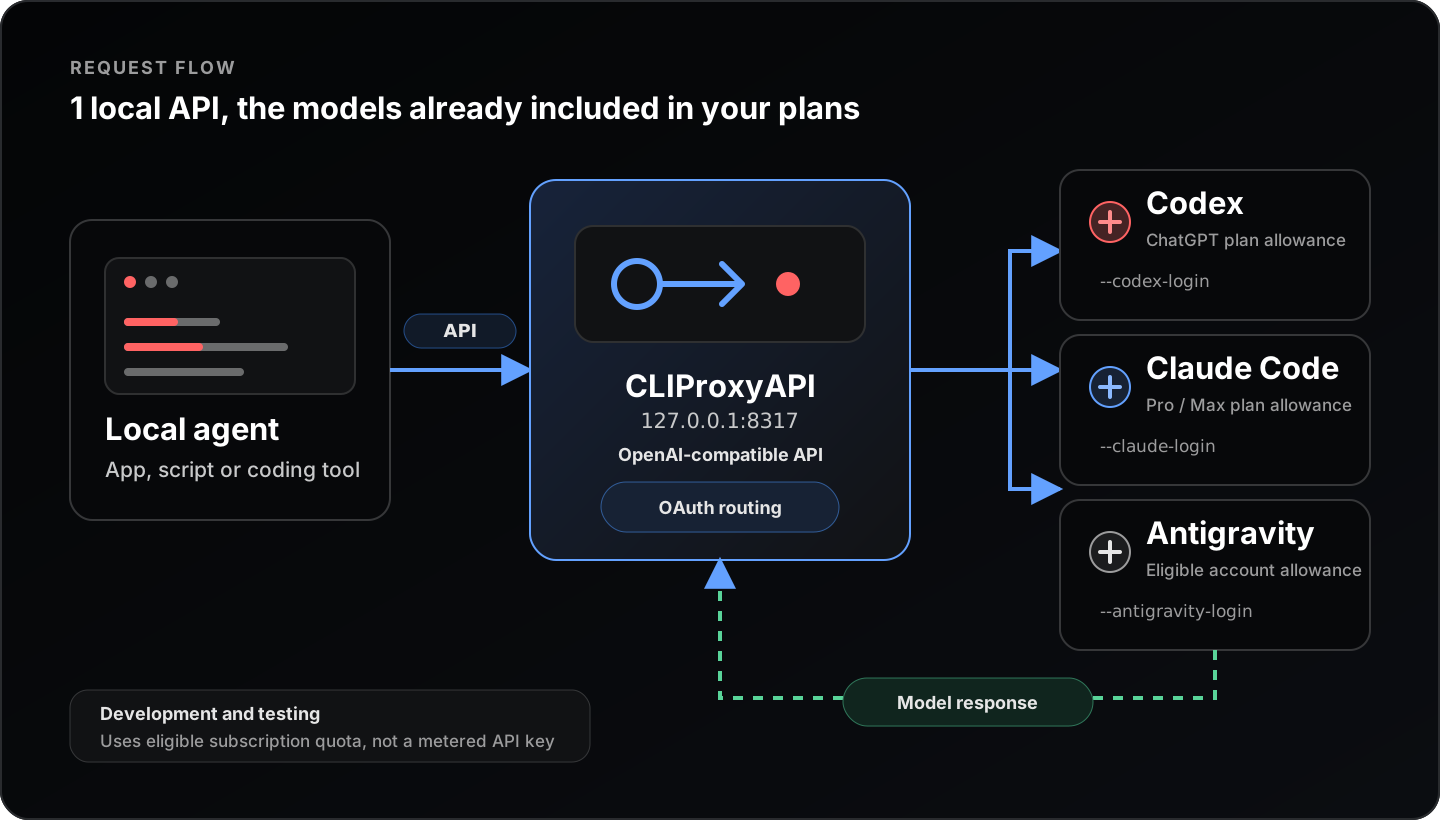
The agent only knows the local endpoint. CLIProxyAPI handles OAuth and sends each request to an eligible model behind the corresponding subscription.
A complete local Docker setup
I prefer Docker here because it keeps the binary and its updates isolated while making the 2 pieces of persistent state obvious: config.yaml and auths/.
1. Create a working directory
mkdir -p cliproxyapi/auths
cd cliproxyapi
Create a .gitignore as well:
auths/
logs/
.env
Even if this directory is only for a local test, excluding auths/ is a useful second line of defence.
2. Create config.yaml
host: "0.0.0.0"
port: 8317

auth-dir: "~/.cli-proxy-api"

api-keys:
  - "replace-with-a-long-random-local-key"

remote-management:
  allow-remote: false
  secret-key: ""

debug: false
logging-to-file: false
0.0.0.0 is necessary inside the container so Docker can forward traffic to the process. The Compose file in the next step publishes it only on the host’s loopback interface. Replace the example API key with a long random value; it is the bearer token that local clients will use.
The upstream configuration reference contains many more settings, including retries, account routing, model mappings, and remote management. I start with the smallest configuration and add only what I need.
3. Create compose.yaml
services:
  cli-proxy-api:
    image: eceasy/cli-proxy-api:latest
    container_name: cli-proxy-api
    ports:
      - "127.0.0.1:8317:8317"
      - "127.0.0.1:1455:1455"
      - "127.0.0.1:54545:54545"
      - "127.0.0.1:51121:51121"
    volumes:
      - ./config.yaml:/CLIProxyAPI/config.yaml:ro
      - ./auths:/root/.cli-proxy-api
    restart: unless-stopped
Port 8317 is the API. The other ports receive OAuth callbacks: 1455 for Codex, 54545 for Claude, and 51121 for Antigravity. Binding every published port to 127.0.0.1 keeps the service off the LAN. The project’s official Compose file exposes additional provider ports and persistent directories; this reduced version is enough for the flows in this article.
For repeatable or shared environments I would pin an inspected image version instead of latest. I also would not mount the Docker socket or add privileged mode; this proxy does not need either.
4. Start the proxy
docker compose up -d
docker compose logs --tail=50 cli-proxy-api
The server should listen on port 8317. If it exits immediately, I first check that config.yaml exists, is valid YAML, and is readable by Docker.
5. Authenticate a paid account
For a ChatGPT account with Codex access:
docker compose exec cli-proxy-api \
  /CLIProxyAPI/CLIProxyAPI --no-browser --codex-login
For a Claude Pro or Max account:
docker compose exec cli-proxy-api \
  /CLIProxyAPI/CLIProxyAPI --no-browser --claude-login
For Antigravity:
docker compose exec cli-proxy-api \
  /CLIProxyAPI/CLIProxyAPI --no-browser --antigravity-login
The command prints a URL. I open it in a browser, sign in directly with the provider, approve the OAuth request, and wait for the callback to complete. --no-browser matters inside Docker because the container cannot open my desktop browser itself. The project’s Docker Compose guide uses the same login pattern.
After a successful login, a credential file appears under ./auths. I do not open, copy, or commit its contents. To add another supported account, I repeat the corresponding login command; CLIProxyAPI supports multi-account routing, but I begin with 1 account so quota behaviour remains easy to understand.
6. Discover the models my accounts actually expose
curl --fail --silent --show-error \
  http://127.0.0.1:8317/v1/models \
  -H "Authorization: Bearer replace-with-a-long-random-local-key"
This response is more trustworthy than a model name copied from an old tutorial. Providers add, rename, restrict, and retire models. I choose an exact id returned by my own proxy.
7. Send a small test request
Replace MODEL_ID_FROM_V1_MODELS with 1 of those IDs:
curl --fail --silent --show-error \
  http://127.0.0.1:8317/v1/chat/completions \
  -H "Authorization: Bearer replace-with-a-long-random-local-key" \
  -H "Content-Type: application/json" \
  -d '{
    "model": "MODEL_ID_FROM_V1_MODELS",
    "messages": [
      {"role": "user", "content": "Return only the word ready."}
    ]
  }'
I keep the first request tiny. It verifies authentication, routing, protocol translation, and model availability without burning meaningful quota. If a model does not accept the Chat Completions shape, I use the compatible protocol documented for that model or configure a client that supports the Responses or Anthropic interface.
8. Connect a real client
For an OpenAI-compatible tool, the values are usually:
Base URL: http://127.0.0.1:8317/v1
API key:  replace-with-a-long-random-local-key
Model:    an exact ID returned by /v1/models
For example, the official OpenCode guide points its OpenAI provider at that base URL. CLIProxyAPI also documents dedicated configurations for Codex and Claude Code. I prefer a separate client profile named cliproxyapi so switching back to a normal developer API never happens by accident.
9. Operate and stop it
docker compose logs -f cli-proxy-api
docker compose pull
docker compose up -d
docker compose down
down removes the container and network, but the bind-mounted config.yaml and auths/ remain. Deleting auths/ is different: it removes the locally stored OAuth credentials and requires a new login.
How I compare models without wasting the tier
I use a small, fixed test set instead of free-form chatting. Each model receives the same prompt, context, tool definitions, and output constraints. I record correctness, latency, tool-call reliability, and whether the response followed the requested format. I also run the test in a fresh conversation because a long agent session can make comparisons unfair and consume substantially more allowance.
The subscription approach is a good fit for:
- Trying a model before choosing it as an agent’s default.
- Checking whether 2 models handle the same repository task differently.
- Testing protocol compatibility, streaming, or tool calls.
- Running occasional personal experiments with predictable subscription cost.
It is a poor fit for production traffic, public services, load testing, or anything that needs contractual uptime and stable per-request capacity. For those cases, I use the provider’s supported developer API and budget its token cost normally.
Troubleshooting checklist
If /v1/models returns 401, I verify that the bearer token matches api-keys in config.yaml; it is not the provider OAuth token. If it returns no useful models, I repeat the relevant OAuth login and inspect the container logs. If the browser callback fails, I check that the matching callback port is published and that another local process is not already using it.
If requests reach the proxy but the provider rejects them, I try 1 exact model ID returned by /v1/models, update the container image, and retest with the smallest possible request. I also check the provider’s plan dashboard because a successful OAuth login does not guarantee remaining quota.
Finally, I keep the service local. If I genuinely need remote access, I place it behind TLS, strong authentication, a firewall, and a private network instead of changing the port binding to 0.0.0.0 and hoping the local API key is enough.
CLIProxyAPI is useful because it separates the client from the provider login. I can evaluate the models already included in supported subscriptions through 1 consistent local interface, understand their real limits, and move to metered APIs only when the experiment becomes a production workload.
Thanks for reading, Hack the Planet!